01
Describe the request
Pick a method and a URL pattern — contains, path params, exact or regex — then narrow it with query, header, body or GraphQL conditions.
Chrome extension for API mocking
Mockrew is a Chrome extension that intercepts XHR & Fetch, returns mock responses, simulates errors and delays, and rewrites requests & responses — no proxy required, no backend changes. Rules stay active on every page whether DevTools is open or not.
 Mockrew InterceptingSearch rules (name / URL)
Three steps, no build step and no configuration file.
Pick a method and a URL pattern — contains, path params, exact or regex — then narrow it with query, header, body or GraphQL conditions.
Return a mock with your own status, delay and JSON body, let a Faker template generate data, walk through a sequence, or run a JS hook.
The request log shows what matched and which step answered. Turn any real request into a rule with one click.
From simple static responses to state machines and dynamic scripts — covering most day-to-day integration cases.
Global, project and per-rule toggles with drag-and-drop ordering; rules match in order and the first enabled hit wins.
Contains, path parameters, exact and regex URL matching, plus declarative branching by query, header, JSON body or GraphQL operation.
Return different responses on successive hits, with stop-at-last or loop — perfect for polling and state transitions.
Generate realistic fake data from templates, or write a JS hook that reads the request context to build the response.
Rewrite real request / response headers or redirect URLs to another origin via declarativeNetRequest.
Inspect hits and sequence steps, then turn any logged request into a rule — the whole debugging path stays visible.
The DevTools panel is your rule manager and request log, in light or dark theme.
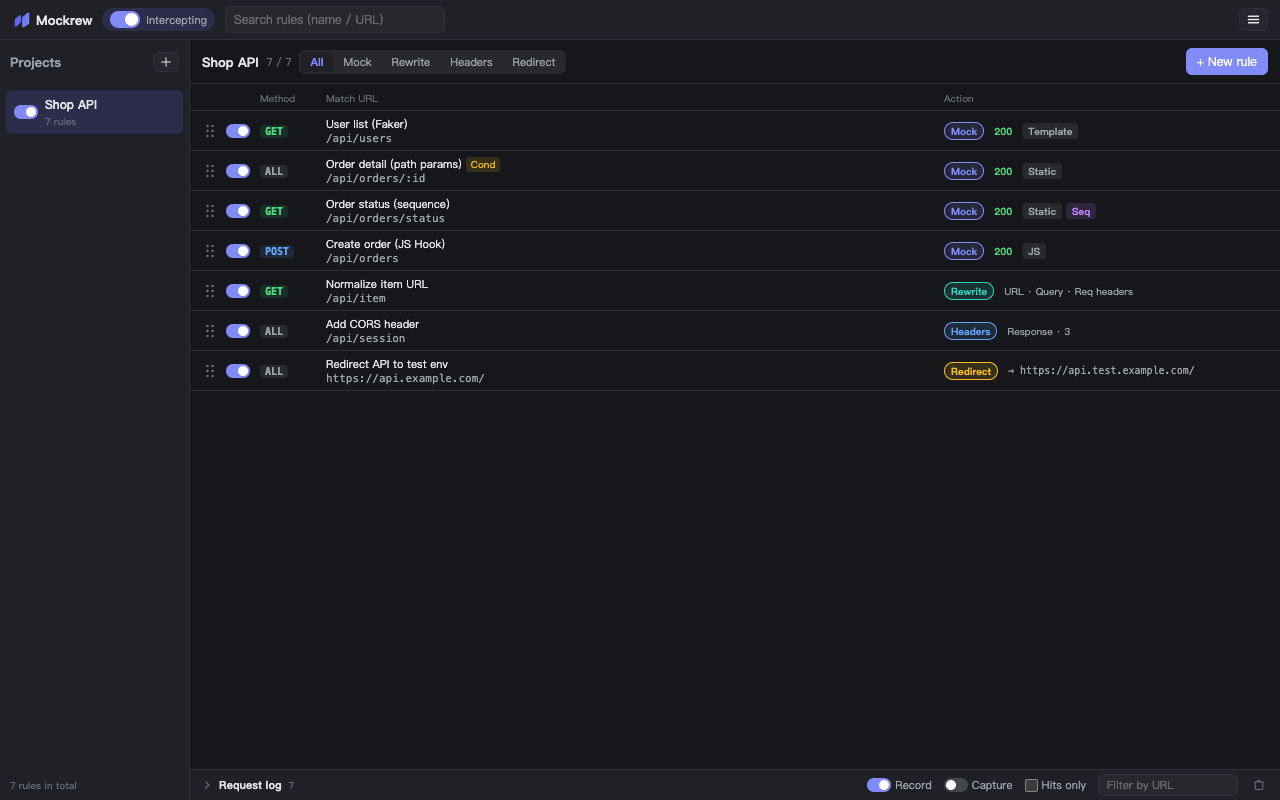
Rule list: organized by project, conditions and actions at a glance
Both approaches can fake an API. The difference is where the request is intercepted and what you have to install to get there.
| Capability | Mockrew | Local proxy tooling |
|---|---|---|
| Certificate to install and trust | None | A root CA on the machine or device |
| Where requests are intercepted | Inside the page (fetch / XHR) and in the browser's network request layer | Outside the browser, after the traffic leaves it |
| Changes needed in the app | None | None, but the proxy must be running |
| Coverage | fetch / XHR in the page; all request types for headers and redirects | All HTTP traffic from the machine, including other apps |
Mocking means handling requests that may carry cookies and tokens. Mockrew is designed so they never travel any further.
Rules, responses and scripts live in the extension’s local storage. Request URLs, headers and bodies are never uploaded.
No analytics, no crash reporting, no usage counters. The extension contacts our server only to activate and validate a Pro licence — never about your API traffic.
Interception and mocking do not need a connection, and the Free plan needs no account at all.
The core toolkit costs nothing. Pro lifts the limits and unlocks dynamic responses.
20 rules, 5 of them active at a time, plus two projects — all the matching, mocking and network request layer actions.
Get started freeUnlimited rules and projects, sequenced responses, JS Hooks and request / response hooks.
Compare plansNo. The interception script is injected when the page loads and stays active. The DevTools panel is just the rule manager and request log.
The page layer covers fetch and XMLHttpRequest. Network request layer actions cover every request type, including subresources and document navigations.
Rules live in your browser's local extension storage and are never uploaded. Pro will add optional cloud sync.
The core toolkit is free for personal development. Pro is $3.50/month or $35/year and unlocks unlimited rules and projects, sequenced responses, dynamic JavaScript responses and hooks — with a 7-day free trial, no card required. Billing opens soon; the trial is available today.
Chrome 116 or newer. That is the first version with the declarativeNetRequest dynamic-rule and offscreen-document capabilities Mockrew relies on.
Rules can point at any API, so the injected script has to be able to run on any page you debug. It only reads requests your page makes, and only answers the ones a rule matches. It never asks for the debugger permission.
Sign in, open your account page (/account) and click Cancel subscription under Billing — that opens the customer portal where you cancel. You can also use the portal link in your payment receipt, or email support. Cancellation stops future charges and Pro keeps working until the end of the period you already paid for.
All payments are generally non-refundable. We do refund where the law requires it, and where we confirm a billing error, an unauthorised charge or a failure of the paid service on our side; an unused subscription may also be refunded at our discretion. Try the free 7-day trial before you buy — the full policy is on the refund policy page.
Yes — Export writes every project to one JSON file, and Import reads it back. You can also import OpenAPI / Swagger, a Postman collection or a cURL command to generate a rule set from an API document.