
GuideTools
Import from OpenAPI, Postman or cURL
Generate a whole rule set from an API document — OpenAPI / Swagger, a Postman collection or a pasted cURL command.
Instead of writing rules one by one, hand Mockrew an API document and it generates one mock rule per endpoint. Open the importer from the panel top bar (Import), then pick a source tab.
Three ways in
| Tab | Accepts |
|---|---|
| File | OpenAPI / Swagger, Postman Collection, or a Mockrew export — .json, .yaml, .yml |
| URL | A public OpenAPI JSON / YAML URL, or a Mockrew share link |
| Paste | The document itself, a single Mockrew rule, or a cURL command — no file needed |
Step 1 — parse
Mockrew detects the format (OpenAPI / Swagger, Postman Collection, cURL) and counts the endpoints. Documents over 5 MB are rejected; very large ones are parsed up to a limit and marked as truncated.
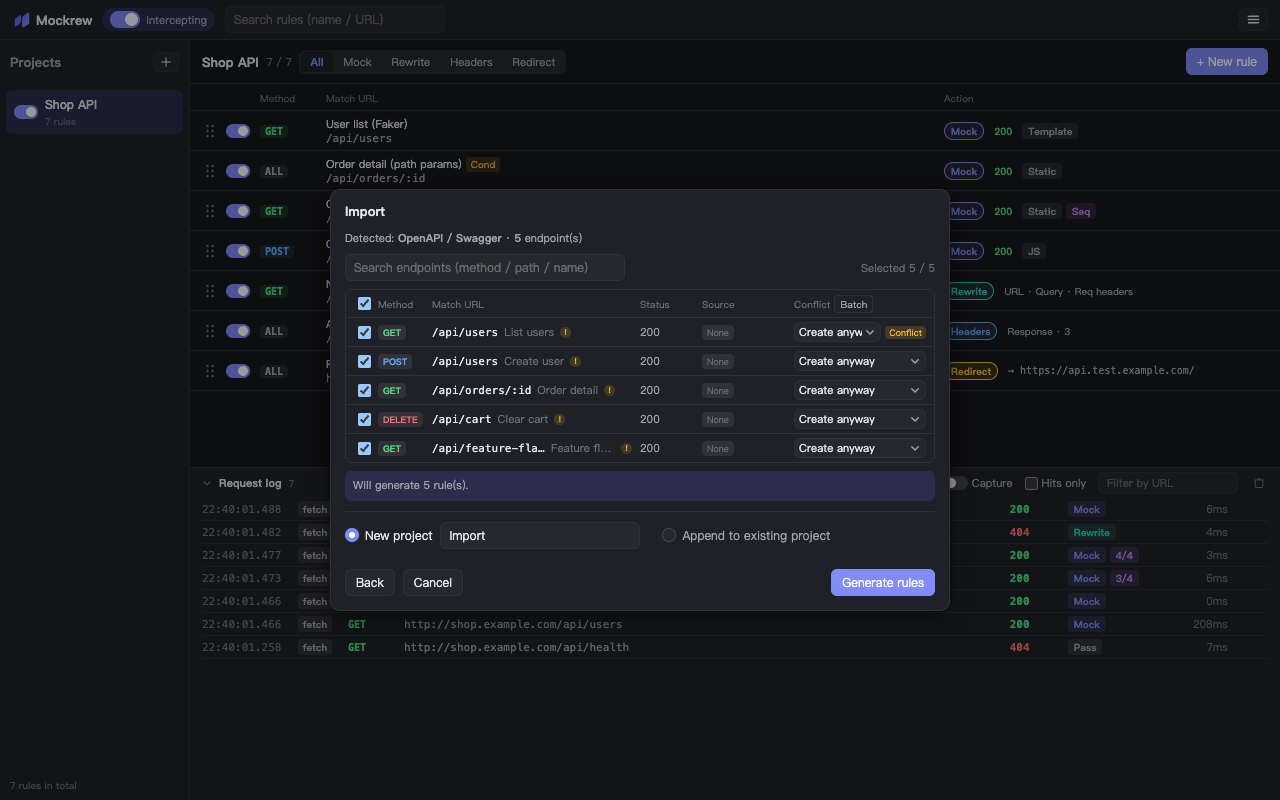
Step 2 — pick endpoints
The endpoint table lists method, path, name, status and where the response body came from:
| Source | Meaning |
|---|---|
| Example response | The document carried a concrete example — used verbatim |
| From schema | No example — the body was generated from the JSON Schema |
| None | No response defined — an empty body is generated |
- Search by method, path or name; select all / none in one click.
- Conflict — an existing rule already matches this request; choose *Create anyway*, *Skip* or *Overwrite same-URL rule*.
- Dup — the document itself contains the same method + URL twice.
- Batch applies one conflict decision to every selected row.
Step 3 — choose a destination
- New project — the imported endpoints land in a fresh project.
- Append to existing project — add them to a project you pick.
- Merge — replace same-name projects, or merge rules into the matching project.
- Replace all — wipe current projects first (asks for confirmation).
The footer shows how many rules will be written. On the Free plan, rules beyond your remaining quota are reported before writing — nothing is silently dropped.
Known limitations and warnings
| Warning | What happened |
|---|---|
| No response content | The endpoint had no response example or schema — an empty body was generated |
| No example provided | The body was derived from JSON Schema instead of an example |
| URL variables unresolved | Server variables ({version}, {region}) were kept as placeholders — edit the rule URL |
| Cyclic references | A recursive schema was expanded up to a depth limit and truncated |
| Unsupported method | The method is not one of GET / POST / PUT / PATCH / DELETE / HEAD / OPTIONS — matched as ALL |
Generated rules are ordinary rules: edit them, reorder them, export them. Re-importing a Mockrew export is also how you move a rule set between machines.
Stuck, or need something clarified? support@mockrew.com·Terms of Service