
GuideRewrite & network
Headers action (network request layer)
Add, remove or change request / response headers at the browser’s network request layer — for every request type.
The Headers action is executed by the browser (declarativeNetRequest) before the request is sent: the browser adds, removes or changes the configured headers. The real request and response body are untouched.
fetch, XHR, sub-resources (<script>, <link>, images) and document navigations — and work whether DevTools is open or not.Operations
| Operation | Effect |
|---|---|
| Set | Add the header, or overwrite it when it already exists |
| Append | Add another value without removing the existing ones |
| Remove | Delete the header from the request or the response |
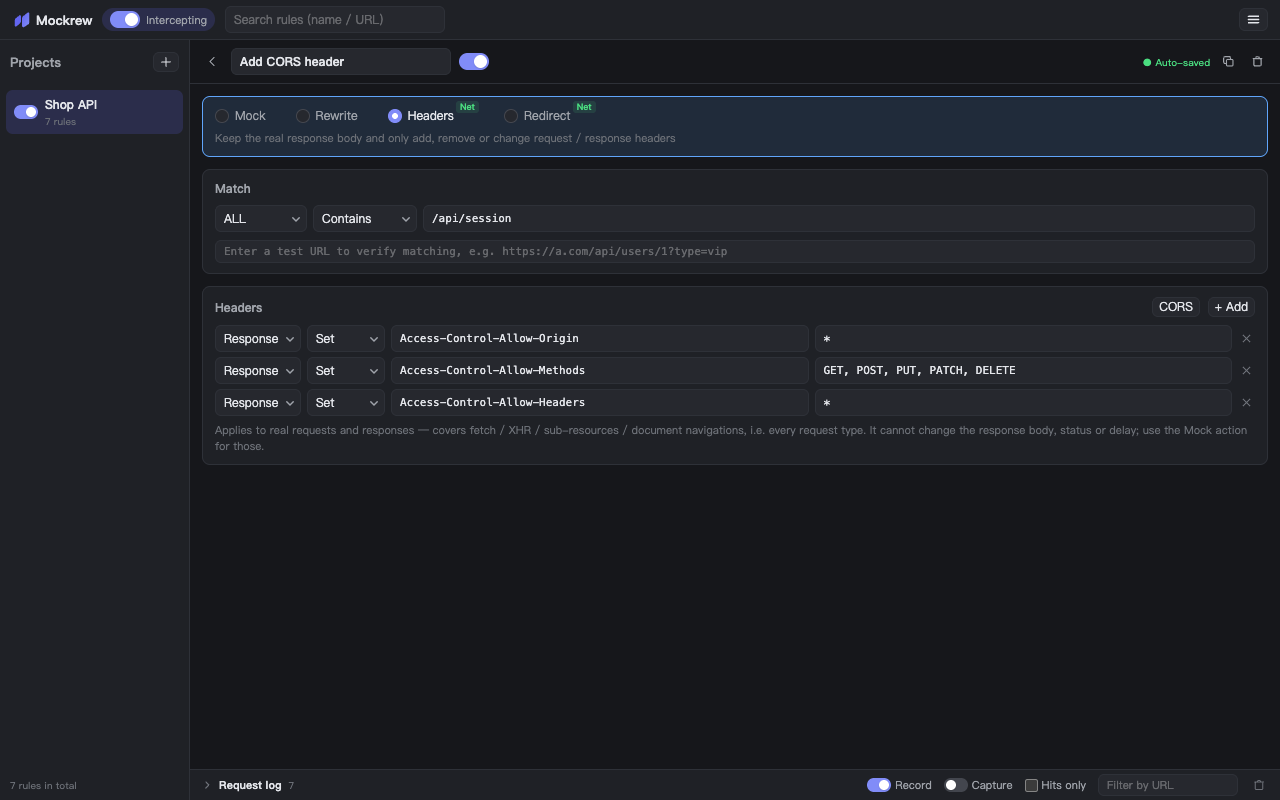
Each row has a Target (request or response), a name and, for Set / Append, a value. Rows are independent — one rule can carry both request and response changes.
A common case: unblock a cross-origin API by adding the CORS response headers yourself. The Add CORS response headers button fills in the three standard headers; add Access-Control-Allow-Credentials: true when the call uses cookies.
What it cannot do
- Change the body, status or delay — use the Mock action for those.
- Modify browser-protected headers (
Host,Content-Length,Cookiein some contexts, and a fewSec-*headers). The rule list marks such a rule as not taking effect, with the reason on hover. - Change headers for requests that never reach the browser’s network request layer (a page’s own service worker or an in-memory cache response).
Stuck, or need something clarified? support@mockrew.com·Terms of Service