
GuideRewrite & network
Redirect action (network request layer)
Redirect matching requests to another origin or a rewritten URL.
The Redirect action rewrites matching requests at the browser’s network request layer — the original destination never receives them. Two modes are available.
Replace origin
Swaps scheme, host and port of the target while keeping the original path and query — https://api.prod.com/users?page=2 becomes http://localhost:3000/users?page=2. The target may carry a path prefix: the original path is appended after it.
The query-params table can add, replace or remove parameters on the redirected URL — handy to append env=test everywhere, or to strip a cache-buster like _t.
Regex substitution
Replaces the first fragment of the URL that matches the pattern. To replace the whole URL, anchor it yourself with ^ and $, and reference capture groups with \1, \2… The replacement must be a whole http(s) address.
Match:        ^https://api\.example\.com/(.*)$
Replace with: https://api.test.example.com/\1\1 style references work in the replacement — $1 is taken literally. And a bare path replacement is rejected: the browser needs a full address to build the new URL.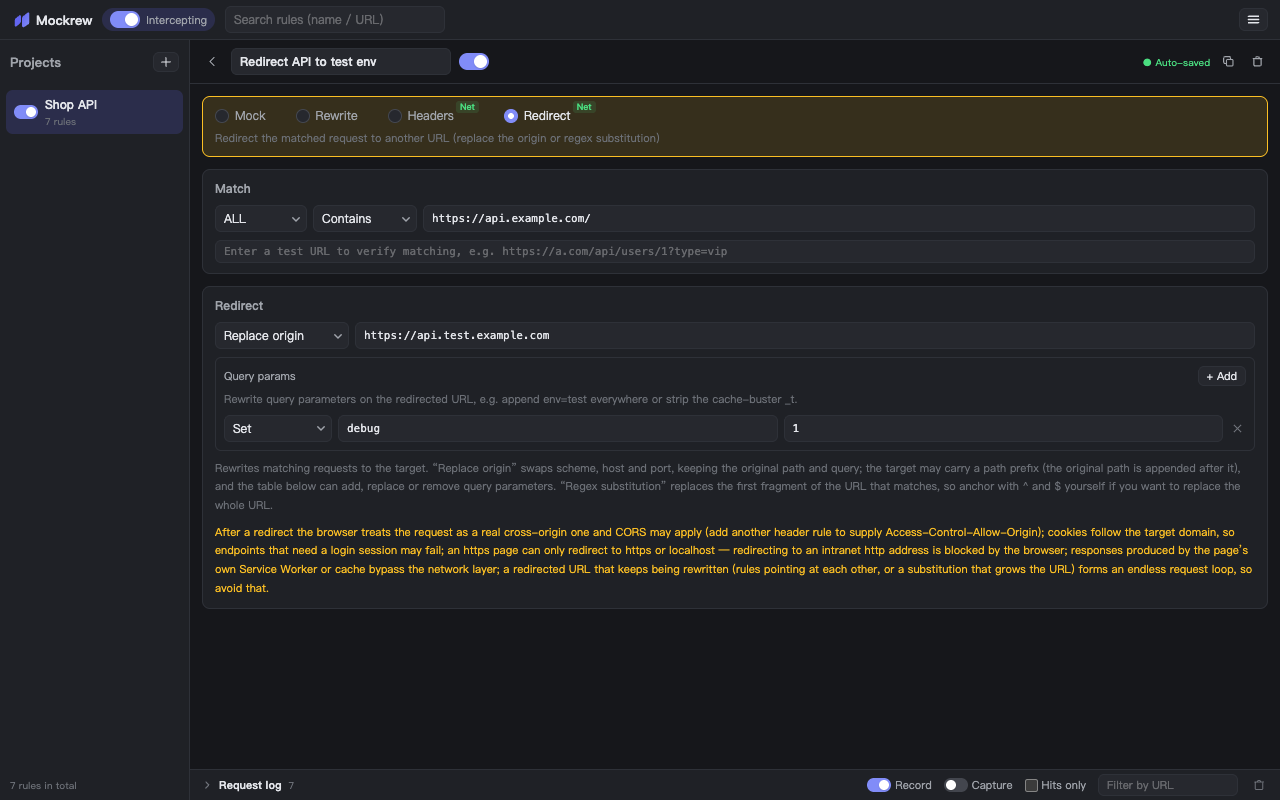
Caveats
- The browser treats the redirected request as a real cross-origin request — CORS may apply. Add a Headers rule to supply
Access-Control-Allow-Origin. - Cookies follow the target domain, so endpoints that need a login session may fail.
- An
httpspage can only redirect tohttpsor localhost — intranethttptargets are blocked by the browser. - Responses produced by the page's own Service Worker or cache bypass the browser's network request layer.
- Avoid rules that keep rewriting their own output (rules pointing at each other, or substitutions that grow the URL) — that forms an endless request loop. A target that resolves to the current URL is safe: the browser skips a redirect that changes nothing.
The panel detects such loops before they start: a chain of redirect rules that keeps rewriting the same URL is flagged on the rule, with the chain shown in the warning.
Stuck, or need something clarified? support@mockrew.com·Terms of Service