
GuideTools
Request log
See what matched, follow sequence steps and turn any request into a rule.
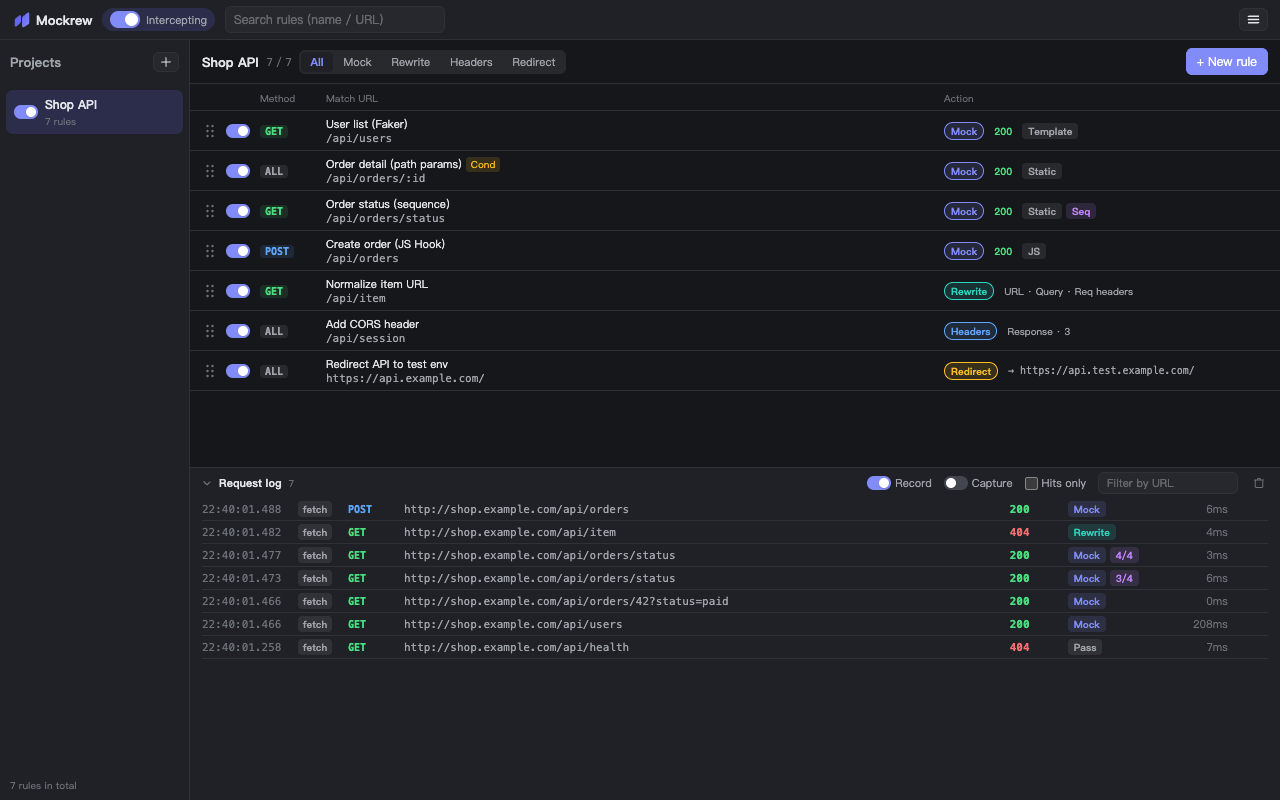
The request log at the bottom of the panel records fetch / XHR requests of the current tab — mocked hits and passed-through requests alike. It only records while DevTools is open and is cleared when DevTools closes.
Controls
| Control | What it does |
|---|---|
| Record | Turn logging on / off. Mocked hits are always shown while the log is visible. |
| Capture | Also store response bodies of passed-through requests, so you can build a rule from a real response. Has a performance cost and is off by default. |
| Hits only | Hide requests that no rule matched. |
| Filter by URL | Substring filter across the log. |
| Clear | Empty the list. Display-only — clearing never affects interception. |
Reading an entry
- Pass — the request went out untouched.
- A rule name — the request was mocked or rewritten by that rule.
- Sequence step —
step 2 of 4, so you can follow a state machine. - Network request marker — a matched Headers / Redirect rule is executed by the browser; check DevTools → Network for the actual effect.
- GraphQL operation —
query,mutationorsubscriptionplus the operation name, when one was detected on a mock / rewrite hit.
From log entry to rule
Hover an entry and click +Rule to create a rule from that request — method, URL and response come pre-filled (the response from the captured body when Capture was on). If a matching rule already exists, you are asked before a duplicate is created, with a shortcut to the existing rule.
The log is display-only: clearing it never affects interception, and interception does not require the log to be open.
Stuck, or need something clarified? support@mockrew.com·Terms of Service