
GuideMock responses
Sequenced responses
Return a different response on each hit — a state machine for polling and status transitions.
Sequenced responses are a Pro feature. On the Free plan a rule configured as a sequence is kept but does not take effect.
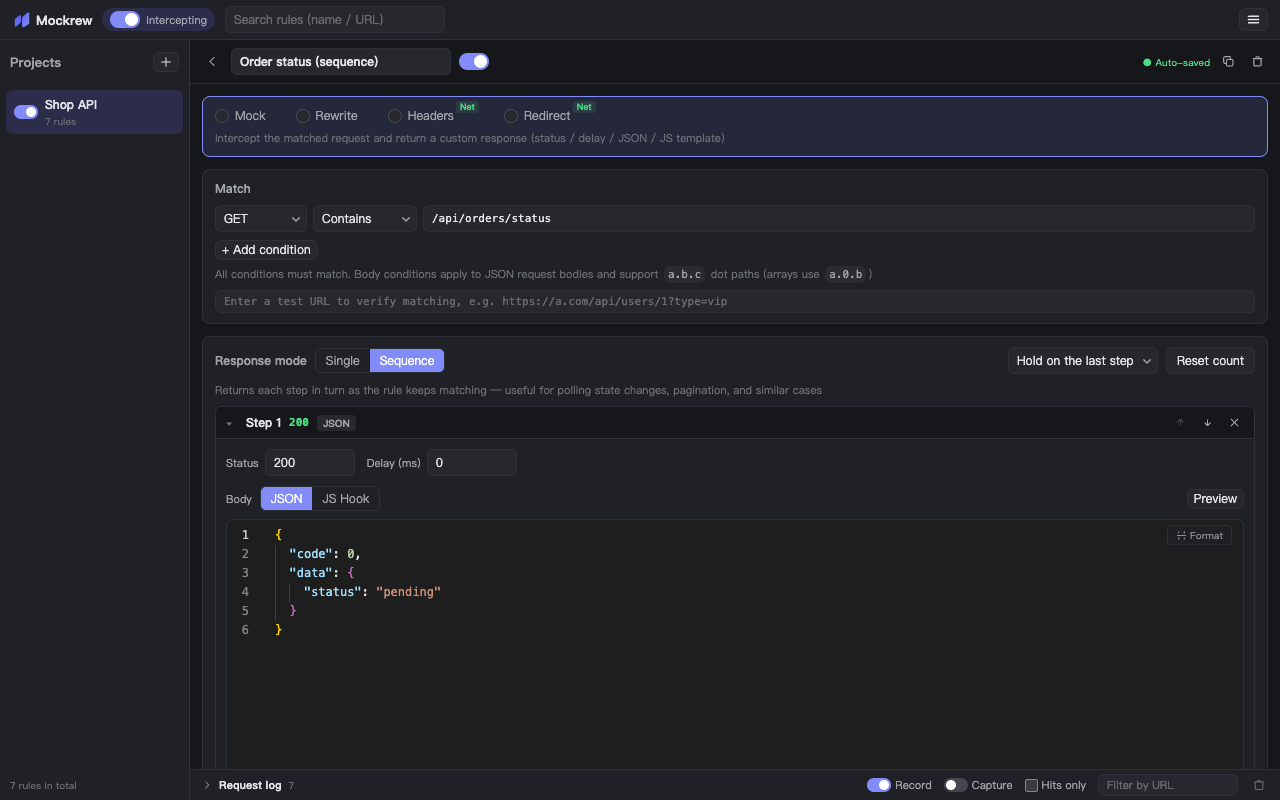
Switch Response mode to Sequence and split the response into steps. Each time the rule matches, the next step is returned — useful for polling, pagination and multi-step flows.
How it works
- Every step has its own status, delay and body (JSON or JS Hook).
- Steps can be reordered, added and deleted while the rule is live.
- After the last step: Hold on the last step keeps returning it, Loop starts over from the first one.
- The counter is shared across browser tabs and resets when the browser restarts. Reset count starts over manually.
Step 1  →  { "code": 0, "data": { "status": "pending" } }
Step 2  →  { "code": 0, "data": { "status": "paid" } }
Step 3  →  { "code": 0, "data": { "status": "shipped" } }
Step 4  →  { "code": 0, "data": { "status": "done" } }   ← Hold here
The request log shows which step answered each hit — Sequence response: step 2 of 4 — so you can follow the progression without adding console output.
When to prefer a JS Hook
Sequences are positional: the Nth hit gets the Nth step, regardless of the request. If the next response should depend on what the client sent, use a JS Hook instead — it can branch on context.req.body and keep its own state in a closure.
Stuck, or need something clarified? support@mockrew.com·Terms of Service