
GuideMock responses
Mock action and response body
Return a custom status, delay, headers and body — with Faker templates for realistic fake data.
The Mock action intercepts the matched request before it leaves the page — the real backend never sees it — and returns the response you configured. It is the only action that can change the body, status and delay.
| Action | Real request sent? | Can change |
|---|---|---|
| Mock | No — answered in the page | Status, delay, headers, body |
| Rewrite | Yes — only the parts you configure change | URL, query, headers, body (both directions) |
| Headers | Yes — browser-level header edit | Request / response headers only |
| Redirect | No — sent to another URL | Destination URL |
Status, delay and headers
- Status — any HTTP status code, e.g. 200, 201, 404, 500. The status text is derived by the browser.
- Delay (ms) — holds the response before delivering it, to exercise loading skeletons, spinners and timeout paths.
0delivers immediately. - Response headers — free-form name / value lines. The CORS preset button adds
Access-Control-Allow-Origin,-Methodsand-Headersin one click for cross-origin calls.
Body modes
- Auto-detect — if the body contains a Faker placeholder the template engine runs; otherwise the body is returned byte for byte.
- Static — always return exactly what you typed, placeholders included.
- Template (force) — always run the template engine, even when no placeholder is present.
JSON is validated as you type and formatted on demand (Format in the editor toolbar). An invalid document is reported with the parse error and cannot be saved as valid JSON — fix it or switch the body to a JS Hook.
Faker templates
Any recognised {{...}} placeholder switches the body into template mode. Templates are powered by Faker.js, and each placeholder is a Faker module path — person.fullName, internet.email, number.int — so the library documentation covers every value you can generate.
{
  "code": 0,
  "data": {
    "list|3-6": [
      {
        "id|+1": 1,
        "name": "{{person.fullName}}",
        "email": "{{internet.email}}",
        "age": "{{number.int({\"min\":18,\"max\":60})}}",
        "city": "{{location.city}}"
      }
    ]
  }
}
"list|3-6": [...]— generate 3–6 items from the prototype."id|+1": 1— increment the value across the generated items."age|18-60": 1— pick an integer in the range.{{person.fullName}}resolves against the built-in English (en) Faker instance. Other bundled locales are reachable with a prefix —en.,fr.,de.orru., e.g.{{de.person.fullName}}.
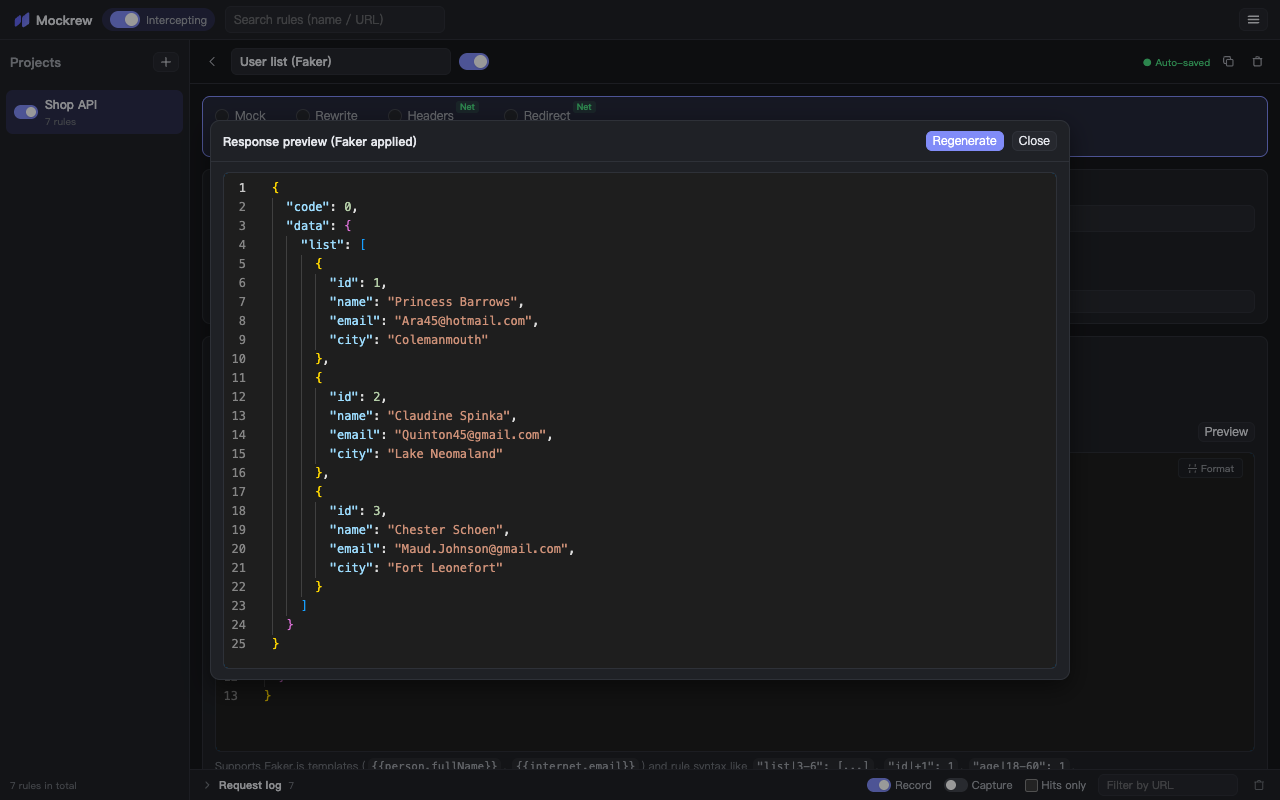
Preview runs the template immediately and shows the generated document; Regenerate produces a fresh random sample. Each real request generates its own values, so a list refreshes on every reload.
GraphQL responses
When the matched request is a GraphQL operation, the body you write is wrapped as { "data": … } automatically — write the payload only. If your body already contains data or errors, it is returned as-is.
Error and edge cases
- Network errors cannot be produced by a mock response — it always resolves. Use status 500 plus an error body to exercise error UI, and a long delay to exercise timeouts.
- Binary bodies (images, zip) are out of scope: mock JSON and text. Use Redirect to a local file for binary payloads.
- Large bodies are fine in principle but count toward the 10 MB extension storage limit together with your rules.
Stuck, or need something clarified? support@mockrew.com·Terms of Service